Files pile up in components/ and hooks/ until nobody can say which screen any of them belongs to. Splitting directories by file type produces that outcome as an application grows.
One feature sends you through distant directories, and its review scatters tiny edits across the codebase. Someone joining midway may not even know which files are safe to remove. Strict rules can appear to solve this, but teaching, enforcing, and maintaining them has a cost of its own.
I used Bulletproof React as a starting point for a feature-oriented structure instead. The directory names are the least interesting part: what matters is the problem being solved, where the boundaries go, and whether a team can make the same decision repeatedly.
GitHub - alan2207/bulletproof-react: 🛡️ ⚛️ A simple, scalable, and powerful architecture for building production ready React applications.🛡️ ⚛️ A simple, scalable, and powerful architecture for building production ready React applications. - alan2207/bulletproof-react github.com
What the architecture should provide
I wanted two things:
- Similar requirements should lead to similar structures, regardless of when someone joined the project or how experienced they are with React.
- The files needed to change one feature should be kept as close together as practical.
I previously organized files by technical type:
src/
├── components/
├── hooks/
├── models/
├── modules/
└── pages/
This is easy to understand while an application is small. As it grows, components and hooks become crowded. A pages/components directory can hold page-specific pieces, but placement then depends on predicting whether something might be shared later.
Reusability is difficult to predict when code is first written. Leaving the choice to individual judgment produces either unnecessary shared abstractions or several disconnected implementations of the same feature.
Organize around features
Use the product capability, not the file type, as the placement rule. A favorites feature can keep its UI, API code, Hooks, types, and tests together under features/favorites.
src/
├── app/
├── components/
├── features/
│   ├── favorites/
│   └── products/
└── pages/
Reserve components for pieces such as Button that do not depend on a product feature. When in doubt, keep a component inside the feature that uses it. Promote it only after several features genuinely need it.
Product requirements now guide placement. The scope of related code is also easier to identify when a feature is removed.
Limit dependencies between features
Features naturally interact: a product card might let someone add the product to favorites. If any feature can import another feature’s internal files, the impact of a change spreads across the codebase.
Give each feature a small public API, commonly through index.ts.
// features/favorites/index.ts
export { FavoriteButton } from "./components/favorite-button";
export type { Favorite } from "./types";
Consumers import only from that boundary.
// Avoid: depends on the internal layout
import { favoriteActions } from "@/features/favorites/modules/actions";

// Prefer: depends on the public API
import { FavoriteButton } from "@/features/favorites";
ESLint’s no-restricted-imports or a dependency-analysis tool can help enforce this. Trying to describe every relative path and alias in a Linter can, however, make the configuration harder to maintain than the rule itself.
Automate the important violations that are easy to express, then cover the remaining architectural principles in review. The maintenance cost of enforcement is part of the design decision.
Deciding feature boundaries
The hardest question is what counts as one feature. I start with the things and actions that people recognize in the product.
List concepts such as products, favorites, and orders, then describe what people can do with each: add a favorite, remove it, or view the list. Those actions provide useful clues for boundaries.
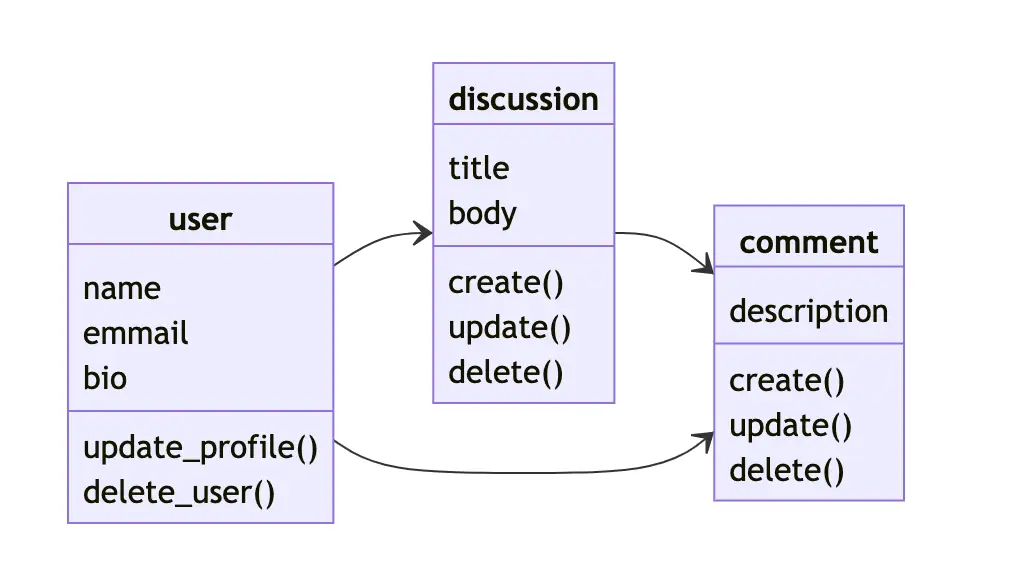
This does not mean every concept must become an object-oriented class. The goal is to use product language to create shared vocabulary across design, implementation, and directory structure.
Do not split too aggressively while a boundary remains unclear. If two areas always change together, keeping them together is more natural. Once changing one repeatedly disturbs unrelated code, that is the signal to separate them.
Do not turn a guide into a template
Bulletproof React describes itself as a guide, not a template or framework. Copying its directory tree matters less than choosing principles that fit the project and applying them consistently.
Where API code lives, where route-level components belong, whether default exports are allowed, and how files are named should follow the framework and the team’s needs. Add a rule when it reduces real ambiguity, not because another project has it.
Closing note
A good directory structure makes the code for a change easy to find, exposes the direction of dependencies, and helps a team decide where the next file belongs. Tidiness is not the measure.
Keep related code close, create boundaries with public APIs, and avoid sharing code before reuse is real. Bulletproof React is an excellent foundation for beginning that discussion.