
React を利用したアプリケーション開発をよくしてきたのですが、開発が進むにつれてアプリケーションの一部を改修したり、新機能を追加するのが辛くなる経験も何回かしてきました。 コンポーネントや機能がどのように依存しているのかが判別つかなくなったり、途中から参加したプロジェクトだと機能を作成や削除するときに必要以上の注意を要求されたりします。また親元となるディレクトリを往復して頭がこんがらがったり、レビューする時にコードが広域に散らばってそれぞれの変更は小さいみたいなことも起こり得ます。 厳密にルールを作って守ればいい問題かもしれませんが、厳密にルールを作るコストも守るコストも維持して運用するコストもかなり高いため、緩めの形で合意を取るパターンであっても、開発がし易くて変更が容易になりそうなアーキテクチャ設計を、bulletproof-react に期待して試してみたので記事としてまとめていきたいと思います。ディレクトリ構成より何を解決したかったのか、何で悩んだか、拡張性はどうなのかみたいな部分が本質だと思うのでその辺を頑張ってもしお時間がありましたらみていただけると幸いです。
本アーキテクチャに求めるコンセプト
- プロジェクトの参画期間や React の練熟度に依存せず、実装を進めていくと同じ構成になる
- 機能の実装で必要なファイルが散見せずに一箇所に集まっている
私がよく利用しているディレクトリ構造はこのような形です。ページとして表示するコンポーネントと、それ以外で利用するコンポーネントを中心に、それ以外の必要な機能を管理します。
🗂 src
├── 🗂 components
├── 🗂 hooks
├── 🗂 models
├── 🗂 modules
└── 🗂 pages
各種ページで利用するコンポーネントを細かく分けて components で管理すると、そのディレクトリや hooks がどんどん肥大化することが多々あります。それを嫌って、 /pages/components のようなディレクトリ構造にすると、どっちのディレクトリに格納するかの判断が難しくなります。「共通利用するかどうか」という判断基準はありますが作成しながらそれを判断するのが難しいこともあります。そして融通が効くが判断が難しいから個人の裁量に任せると、不要な共通コンポーネントができたり、必要な共通化ができず後のリファクタリングが大変になってしまいます。
意思決定の中心がコンポーネントの場合にすると、どのコンポーネントや hooks が共通で利用されるべきかそれとも内側に閉じ込めるべきかの判断基準が曖昧なことが大きな問題になります。
機能を中心に「特定の機能を実装するものか」を判断基準にすると、アプリケーションの要件が決まっていれば誰でも features に入れるか共通にするかの判断ができるはずです。
なのでこのアーキテクチャに求めていることの 1 つは共通かどうかの判断基準を確かに与えるということになります。
実装してみる
利点や懸念点などを確認したかったので実際に自分で手を動かしてみました (リポジトリ)。大きめの懸念点は書いていくのですがだいたいは公式の説明通りで私は上手くいっているかなと感じています。 記事執筆後もさまざま実装を試みてるので完全なサンプルは公式に倣っていただけると幸いです。一部ディレクトリ名や構成を変更したりしていますが、概ね bulletproof-react Project Structure で紹介されている内容と同じです。
機能間での依存
2 つの機能がやりとりをするときに依存が発生します。商品を表示するコンポーネントの中に「商品をお気に入りに登録できる」機能があった場合、商品表示のコンポーネントはお気に入り登録機能に依存します。お気に入り登録するコンポーネント側に変更があった場合、例えば props の変更が起きた場合には商品表示側でも変更が必要になります。小規模なら問題ありませんが、機能間で好きなようにインポートを行うと、どんどん複雑になってしまいます。
そのため、bulletproof-react では some features → greeting feature で自由な依存が発生しないように 2 つのルールを追加しています。
- feature の中でも公開していい部分のみ
/features/index.tsに記載する /features/*/**/からのインポートが発生しないように ESLint にルールを追加する
https://github.com/alan2207/bulletproof-react/blob/master/.eslintrc.js#L39-L44
機能として公開するべき部分と隠蔽するべき部分を切り分けられるのでとても良い実装だと思います。ですがこのルールを採用する上で ESLint の設定として絶対パスでのインポートのみをチェックしていることに留意する必要があります。なので相対パスでインポートをしてしまうと features/*/* 以下のコードを自由にインポートできてしまいます。
// NG
import { favoriteActions } from "../../../features/favorite/modules";

// OK
import { favoriteActions } from "@/features/favorite/modules";
一つ目の解決策として、no-restricted-imports で相対パスを利用してのインポートを禁止することが挙げられます。該当ルールに "patterns": ["../../"] を追加することで対応ができます。ですが、例えば greeting 機能があるとしてその中でもインポートをするために絶対パスを指定する必要が出てきます。
また、features ディレクトリ以下で features という名前が入っている import を行えないようにするという設定もできますが、各種機能は feeatures ディレクトリにあるので相対パスを利用すれば普通にルールをすり抜けられるので特に意味がありません…。
features ディレクトリ以下のディレクトリ構造が同じであることを利用して、下記のようなルールを作り上げることもできます。
- 絶対パスのインポートで features が含まれる場合はエラーにする
- 相対パスで 2 階層以上戻る場合をエラーにする
const config = {
  rules: {
    "no-restricted-imports": [
      /** ... */
    ],
  },
  overrides: [
    {
      files: ["src/features/*/**"],
      rules: {
        "no-restricted-imports": [
          "error",
          {
            patterns: ["../../*/**"],
          },
        ],
      },
    },
  ],
};
ですが src/features/greeting/components/create/index.tsx のようにさらにディレクトリが細かくなるとさらに深い相対パスのケースを指定する必要が出てきます。これよりさらに深くなるなどを考えると列挙がかなり難しくなってきます。
src/features/*/*/ 以下に必ずファイルがあることを利用して、下記のようなルール + components のようにさらにディレクトリを持つ場合を加味して、ルールを書き加えたりもできますが、適用されるパターンの列挙がかなり難しいですね。
結局のところ機能をまたぐ場合は「絶対パスを利用する」というルールを定めて守りレビューするしかないですね。コーディングルールは、Linter 側で全て弾くのが理想(ニンゲン ルール マモラナイ)と考えているのでできる限りは設定をしたい気持ちとのジレンマが歯痒い限りです…。
また合わせて features でどこまでバレルを利用するかも検討すると良いでしょう。リファクタリングがしやすいという考えで行けば各機能に関しては公開するためのみに絞った方が良いかもです。
機能をどのように設計するか
根本の問題ですがどのように機能を設計するかを決める必要があります。 1 つの解決策としてはオブジェクトモデリングを行いオブジェクト単位で features の中にディレクトリを作ることがあげられます。つまりオブジェクトを features の単位に、オブジェクトを介して行われる作業を components ディレクトリ中に定義することで一貫した設計ができると思います。
例えば bulletproof-react のコードからオブジェクトを抽出するとこのようなイメージになります。 このようなイメージになります。features として切り出す単位がオブジェクトとして、オブジェクトでできることをメソッドとして表現しています。また一覧表示などはオブジェクトではなくユーザインタラクションのためのビューなのでクラスのプロパティとしては記載していません。
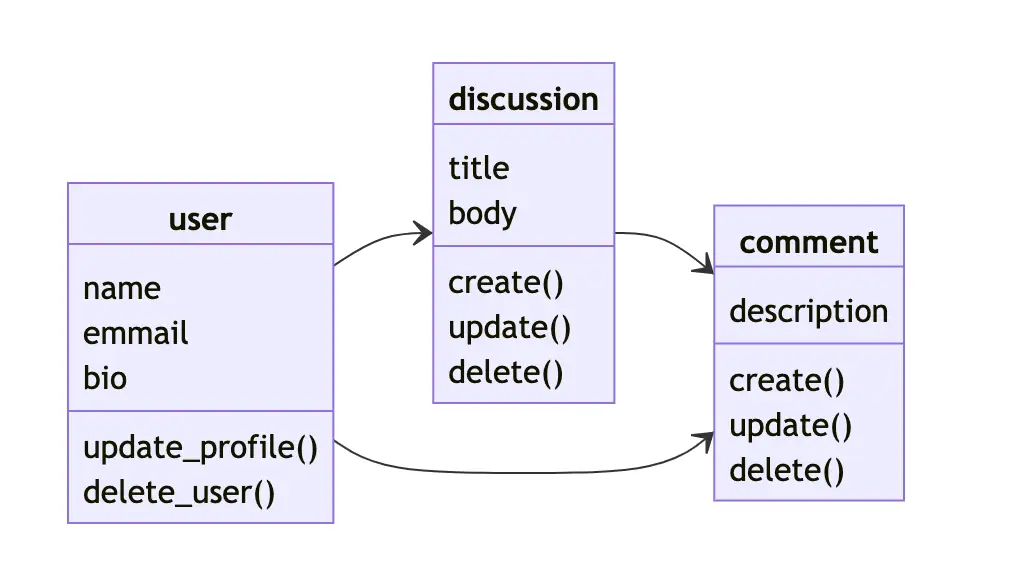
bulletproof-react のアーキテクチャでも feature は特定機能にまつわるモジュールであり、その中の components は特定機能を実装するためのコンポーネントと表現されています。つまりモデリングの結果を反映させやすいため相性が良いかと思います。話が少しそれますが、features の components に配置するコンポーネント粒度についてもある程度の指針が生まれます。どんな機能と実装するべきビューが配置するコンポーネントの大まかな数であり粒度になります。つまりこの考え方を取り入れることでコンポーネントの配置先の問題と粒度設計の問題が大まかに片付くのです。
またモデリングをすることでアプリケーションの設計や考慮漏れがないかの確認、機能間の関係性を把握できる上にそれをアーキテクチャとしても表現できるので割と有用な考え方だと思います。また OOUI を含めて考えるとデザイナーとの共通認識も産みやすいという部分もメリットになります。
そのほか細いところ
基本的には bulletproof-react を議論の土台にしつつ、自分達のプロジェクトに適用する形を取れば良いかと思います。私は features の api ディレクトリに切り分けるより hooks に入れたほうがわかりやすいのでそうするでしょうし、 /src/features/*/routes より /src/pages にパスと呼応するページコンポーネントを配置すると思います。
結局のところ大事なのは、設計において一貫性を保ち続けることとチームで同じ意思決定を行い続けることになります。Readme の免責事項にも同じようなことが書かれています。
Disclaimer: This is not supposed to be a template, boilerplate or a framework. It is an opinionated guide that shows how to do some things in a certain way. You are not forced to do everything exactly as it is shown here, decide what works best for you and your team and stay consistent with your style.
また細かい部分にはなってきますが、 default export を禁止にしたり、ファイルや関数の命名規則、アロー関数か通常の関数宣言かみたいなところも定めておくと当然よりよいコードになるかと思います。
さいごに
bulletproof-react は内容が整然としていてわかりやすい内容である反面、形を模倣するだけでなく、自分達がどのように開発をしていきたいかという部分が重要かなぁと思いました。