Checking every field on each input event and flipping the submit button’s disabled by hand. Even in React, misplacing state produces code close to that. Once state multiplies and distant components can update it, both the reason for a change and its effects get hard to trace.
React’s declarative model gives us a way back.
Imperative and declarative UI
In React, we declare how the UI should look and behave for a given state. An imperative approach, by contrast, directly manipulates the UI after each user action or network response.
Imperative UI
In an imperative UI, event handlers directly change the appearance or behavior of elements.

Imagine a form whose submit button starts disabled. On every input event, code checks all fields and manipulates the DOM to enable the button. On submission, it disables the button again to prevent duplicate requests. The event is directly responsible for changing the display.
Declarative UI
A declarative UI begins with the same events, but its handlers update state instead of manipulating the display. The component derives the current UI from that state.
For the same form, we keep the field values and submission status as state. Input events update values; submission events update the pending state. Whether the button is enabled is calculated from those facts. The handler never says to enable a button. It updates the information that determines the UI.
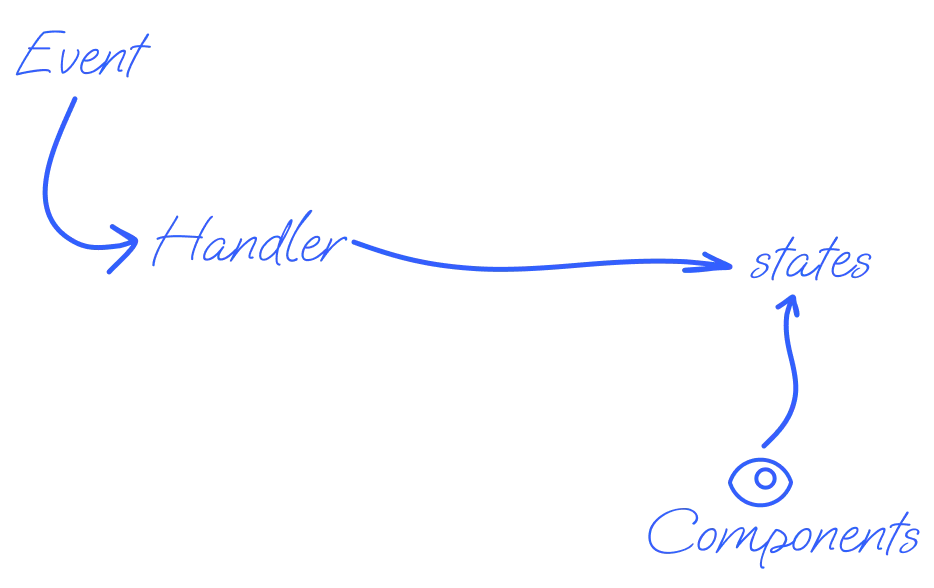
Think in states, not visual mutations
In a declarative UI, handlers update state and components own the mapping from state to display.
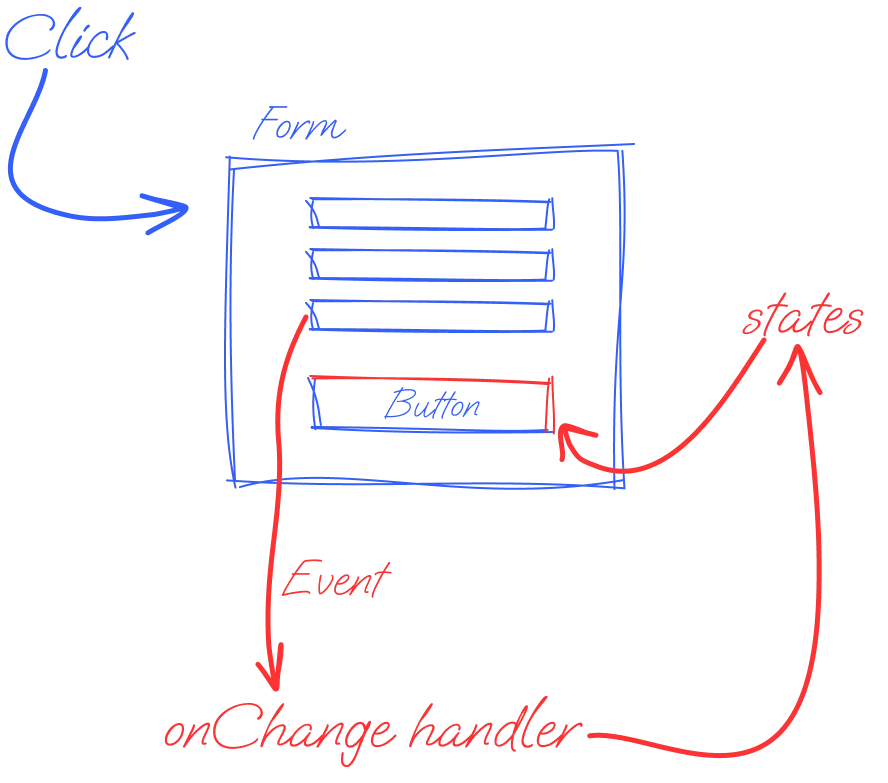
When form input is stored in state, an input handler is responsible for updating its value. The button receives that state and decides its own appearance and behavior. This keeps each input handler from also manipulating the button and reduces the number of places that must change when another field is added.
Declarative code can still become difficult to read. Common causes include storing values that do not need to be state, letting many components read and update the same state, and embedding complicated logic in state updates. I use three rules to keep it manageable:
- Keep state minimal
- Keep state close to where it is used
- Pass meaningful events instead of setters
Keep state minimal
Suppose value B can always be calculated from value A. Storing both produces code like this:
const [a, setA] = useState();
const [b, setB] = useState();

useEffect(() => {
  setB(greetingLogic(a));
}, [a]);
B is not independent state. Because changing A already triggers a render, B can be calculated during that render.
const [a, setA] = useState();
const b = greetingLogic(a);
Do not store a value merely because it appears on screen. Store the smallest set of values that change independently over time or through interaction. Deriving everything else also removes opportunities for the values to fall out of sync.
Keep state close to where it is used
When a parent passes state through several children before it reaches the component that uses it, we get prop drilling.
const A = () => {
  const [state] = useState();
  return <B state={state} />;
};

const B = ({ state }) => <C state={state} />;
const C = ({ state }) => <D state={state} />;
Even when B and C only forward the value, that prop becomes part of their APIs. Passing the setter as well broadens the number of places that can change the state.
The goal is to make it easy to see where state changes and why. Remove unnecessary intermediate layers and place state near the components that need it. If distant parts of the tree genuinely share a value, consider changing the component structure, using Context, or choosing a state-management library suited to the requirement. Avoid making everything global merely to eliminate prop drilling.
Pass events instead of setters
When a child starts a process that affects another part of the UI, let the parent expose an event with domain meaning instead of handing the child a raw setter.
const Parent = () => {
  const [loading, setLoading] = useState(false);

  const handleSubmit = async () => {
    setLoading(true);
    try {
      await doSomething();
    } finally {
      setLoading(false);
    }
  };

  return (
    <>
      <Component onSubmit={handleSubmit} />
      <Button loading={loading} />
    </>
  );
};

const Component = ({ onSubmit }) => (
  <button onClick={onSubmit}>Do something</button>
);
Passing setLoading would let the child change the parent’s state for any reason. Passing onSubmit keeps the state next to the reason it changes. If that logic grows, a custom Hook can isolate it and make it easier to test.
Closing note
When state changes, its owner and descendants may render again. A React application becomes difficult to understand when it is no longer clear where updates originate or what they affect.
Back to the button from the opening: writing declaratively is not the whole job. Deciding how much state you keep, and where you keep it, is what makes the cause and scope of a change visible.